
Sous
Sous is the restaurant AI agent that does the jobs you skip
Menu descriptions, your Google listing, review replies, and winbacks get done without you typing. You decide how much Sous does on its own.
Works withSquareShopifyToastCloverDoorDashand any system that gives you API access

The jobs that wait until after close
Every owner keeps a list that never gets shorter.
- Half the menu still has no description.
- Google shows last year's holiday hours.
- A review from three weeks ago still has no reply.
- A regular stopped coming, and nobody noticed.
- The order link on Google opens an old page.
What Sous takes off your list
Sous works from the menu, hours, and guests you already keep in Appetier.
01
Menu descriptions
Sous writes descriptions for dishes that have none and points out dishes missing a photo, and it never changes a price unless you allow it.
02
Your Google listing
A weekly check fixes hours, links, and categories that stopped matching. Apple Maps, Yelp, and your Facebook Page get the same check.
03
Review replies
Every Google review gets an answer in your voice. Reviews of three stars or fewer, or about an allergy, illness, or your staff, come to you.
04
Regulars invited back
A regular who drifts gets an offer to come back, and new guests get a follow-up. It never offers a bigger discount than you allow.
05
Social posts
Up to three posts a week, made from your own photos and menu. Each one waits for your okay until you let Sous post on its own.
06
Guests asked for a review
After a direct order, the guest gets one link to your Google review form. Each guest who agreed to hear from you gets the same ask, at most once in 90 days.
07
Offers for your slow hours
Sous finds the slow hours of your week from your own orders and drafts an offer for them. A new offer waits for your okay, and it never tops the discount you allow.
08
Holidays and food days
About two weeks before a holiday or a food day, Sous drafts a post and a campaign in your voice. You pick which days it covers.
09
A weekly check for lost orders
Sous reruns the website audit on your site every week. It fixes what it controls and tells you the rest.
10
Your ads, inside your cap
Sous runs Google, Facebook, and Instagram ads on your own ad account and pauses the ones that cost more than they earn. It never raises your monthly cap, and a campaign's first spend waits for your okay.
Ask Sous in the console
Sous also answers questions and makes changes when you ask.
01
Answers about your restaurant
Ask which burger costs the most, whether you're open Sunday, or how ratings look. Sous answers from your restaurant's own records, without ever seeing guest contact or card details.
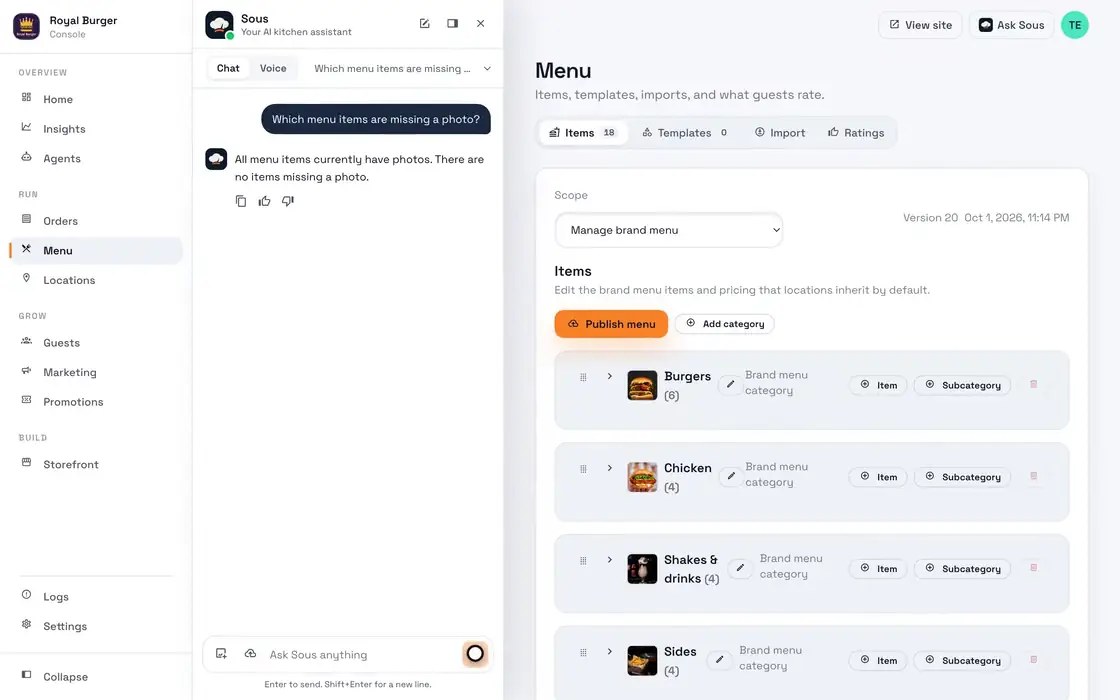
- Ask Sous a question
02
Forms filled in for you
Say "change our headline to Burgers, crowned" and Sous fills in the form with the old beside the new. Nothing saves until you tap Save or say yes, and Undo puts it back.
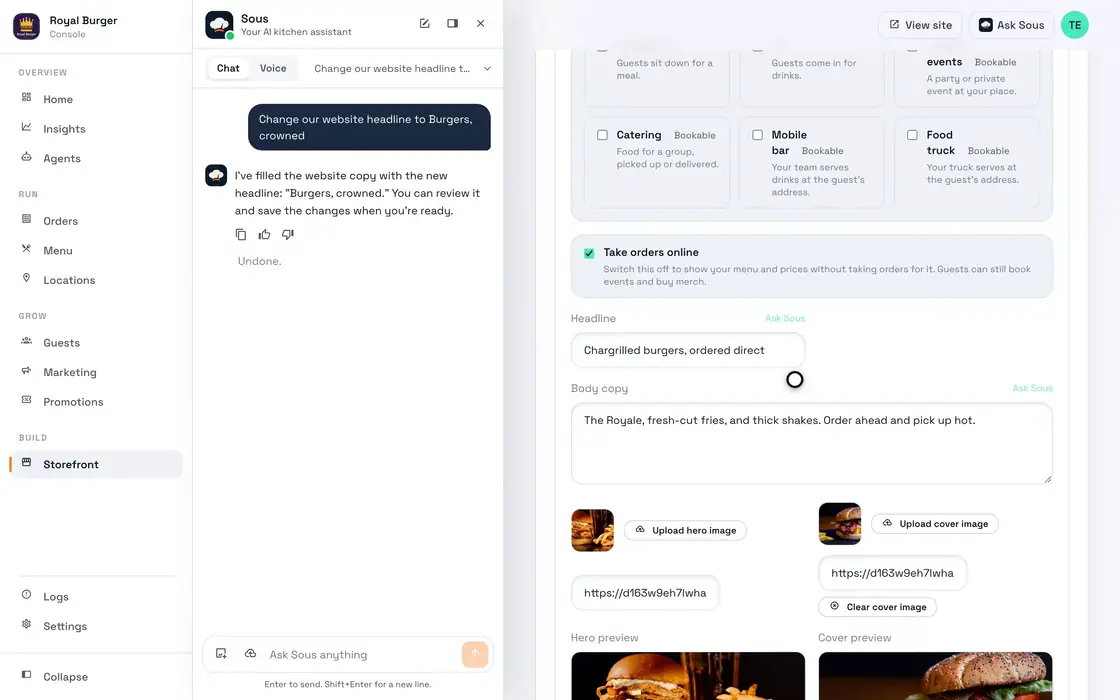
- Ask for a new headline
- Approve the save
- Undo it
03
From a rating to a menu change
Ask which dish guests rated lowest in the last 30 days, and Sous reads your ratings. Tell it to add avocado to a burger's extras for $2, and it fills the form for you to save and publish.
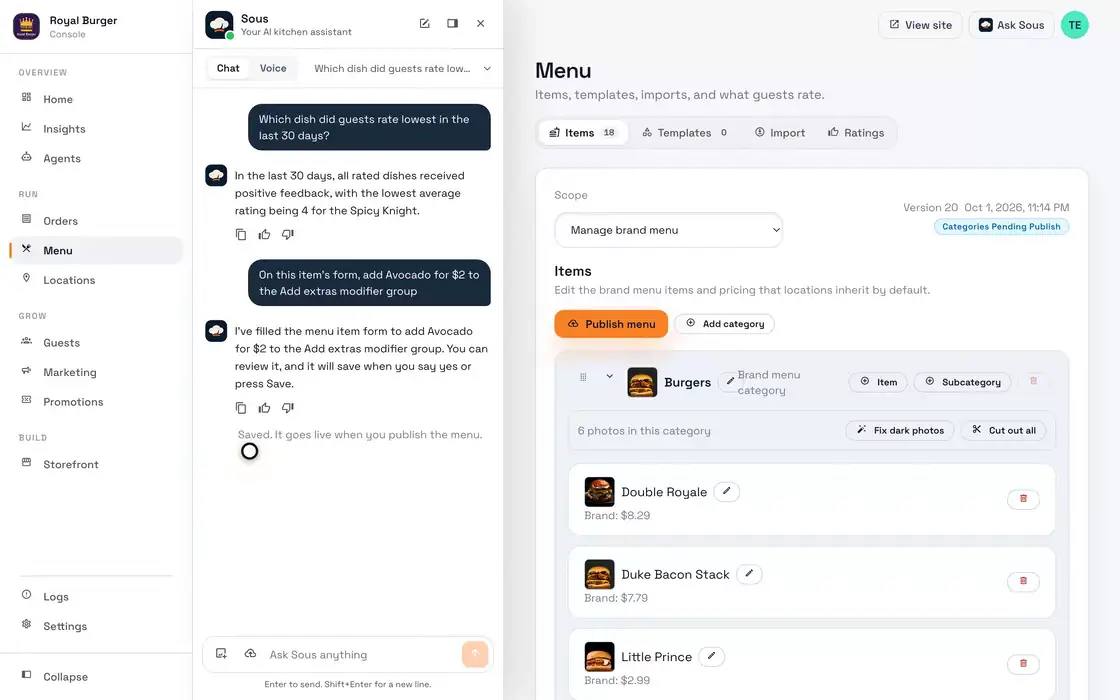
- Ask about your ratings
- Ask for a new extra
- Approve the save
- Undo it
04
New dishes from one sentence
Say "add a Truffle Crown burger to Burgers for $9.49" and Sous fills in the new item where it belongs. You tap Create to add it, and guests see it once you publish.
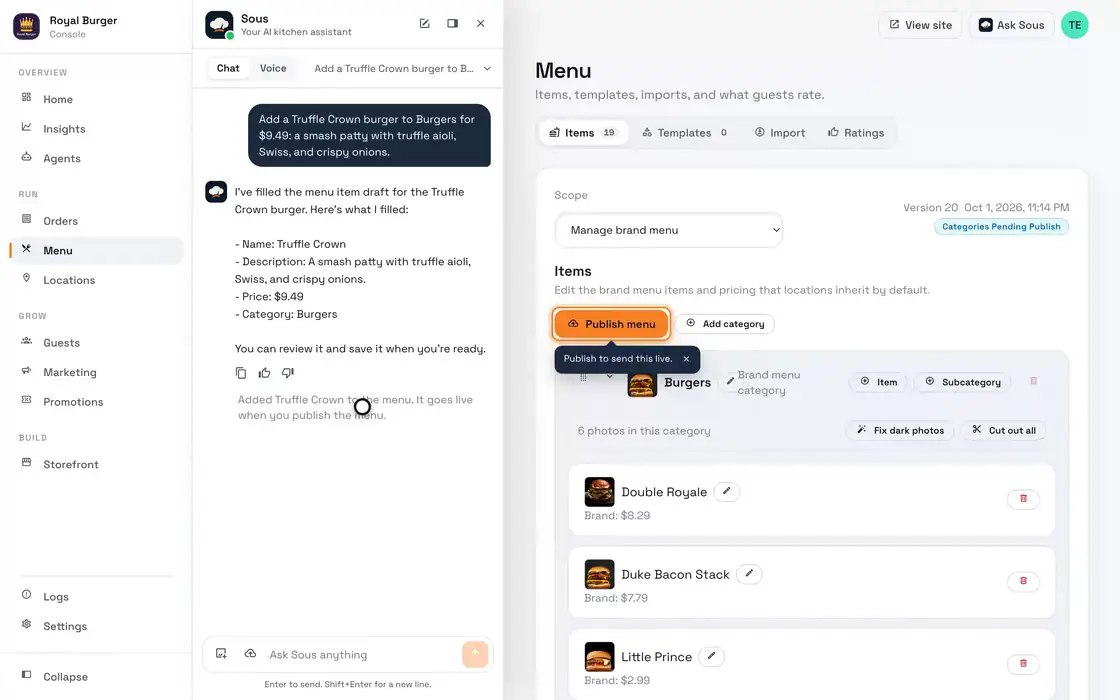
- Ask for a new dish
- Create the item
05
Answers from your own numbers
Ask how Tuesdays compare, and Sous reads four weeks of your sales and names each day's average. Ask for a text, and it drafts the SMS, then you pick who gets it and send it.
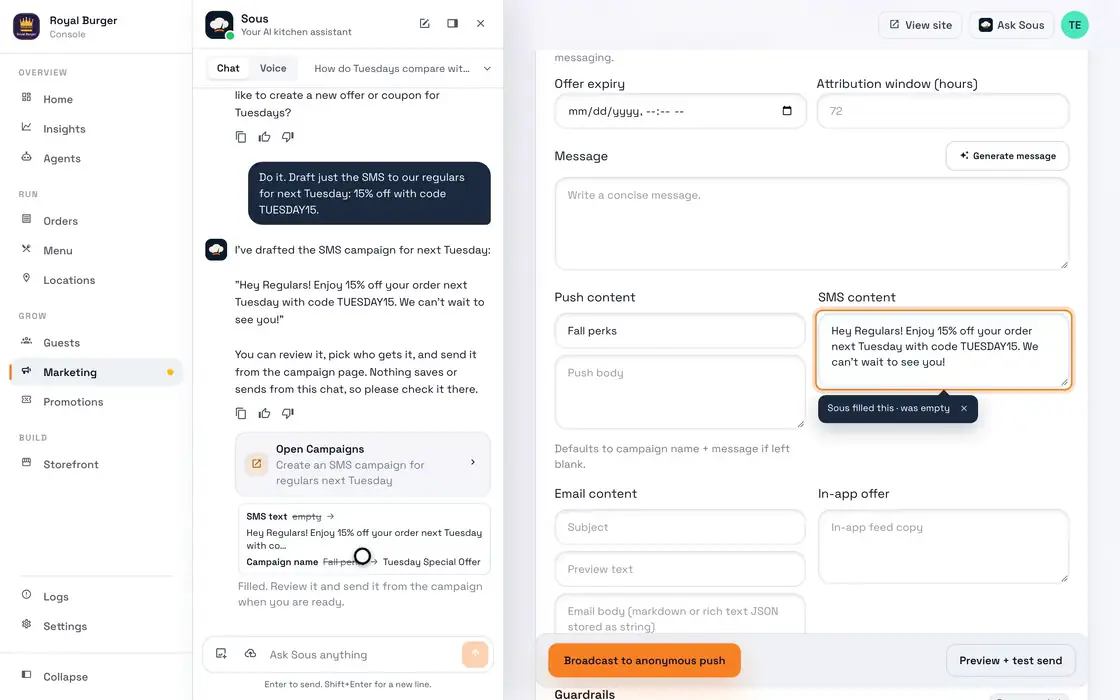
- Ask how Tuesdays compare
- Ask for the SMS
06
Sold out from the chat
Tell Sous a dish is out, and it marks it sold out in your POS once an owner or admin approves with one tap.
07
One change, everywhere
A change you or Sous make reaches your site, apps, POS, marketplaces, and listings, though Yelp can take up to two weeks to show it.
08
Sending stays with you
Ask Sous to send a campaign now, and it opens Campaigns so you can send it, because the chat never sends a campaign or publishes your menu.
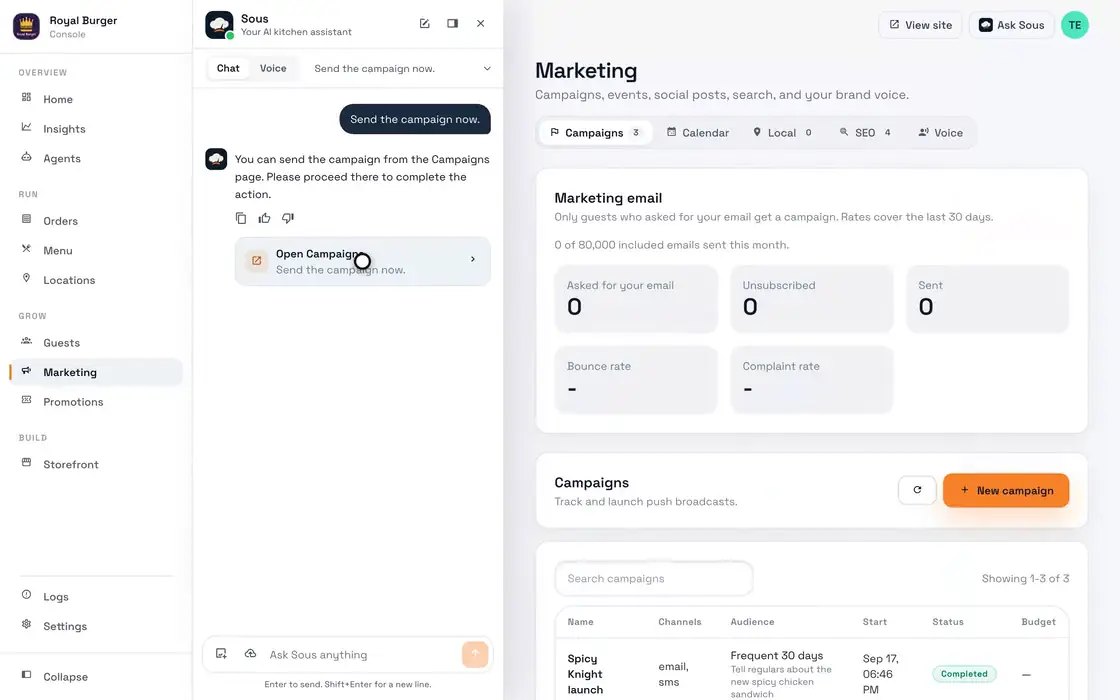
- Ask Sous to send
- Open Campaigns
Sous starts the day you go live
There's nothing to install. Sous works from what you set up in Appetier.
01
Go live from a logo and a menu photo
Sous reads the menu off the photo and takes your colors off the logo, and you check the draft before you publish.
02
Connect Google and your social accounts
Sous needs your Google Business Profile before it can fix the listing or answer reviews.
03
Choose how much it does on its own
Have Sous check with you before each change, or let it work inside your limits, and pause it anytime.
Sous works on your campaigns, your listing, and your menu
01
Campaigns written for you
Sous writes each winback and follow-up, and your limits decide what it can offer.
See restaurant marketing02
A Google listing that stays right
Hours, menu links, and review replies stay current on Google Business.
See restaurant SEO03
A menu that matches the POS
Sous flags a menu that stops matching your POS and marks dishes sold out when you ask.
See POS syncSee the storefront Appetier builds from your site
The test drive builds a private preview from your own website: your name, hours, colors, and photos. We email you when it's ready. The jobs on this page start once you go live.
Sous works with your POS and Google
Sous reads your POS menu and sales, and keeps Google, Apple Maps, Yelp, and Facebook in step. The integrations page lists every connection.
- Square
- Shopify
- Toast
- Clover
- Revel
- Micros
Sous FAQs
What owners ask before they let Sous work on its own.
Is Sous a separate product?
Can Sous change my prices?
What happens with a bad review?
Can I take back something Sous sent?
Who can see my chats with Sous?
Why is it called Sous?
Before you hand work to an AI agent
What restaurant AI does well, and how to check your own site first.
03
Score your current site
A free report on the checks Sous reruns every week, then a private preview of your restaurant.
Audit your website04
Choosing restaurant software
Questions to ask any vendor before you sign.
See the software checklistHand the chores to Sous
Nothing is charged until direct orders come in, so letting Sous work costs nothing up front.